
Blog · dsh plugin
dsh-helper-plugin-workspace-browser
Also known as workspace-browser, dsh /browser, workspace browser, workspace_browser
A Chrome just for this workspace. You watch the page in the sidebar; the model reads and clicks.
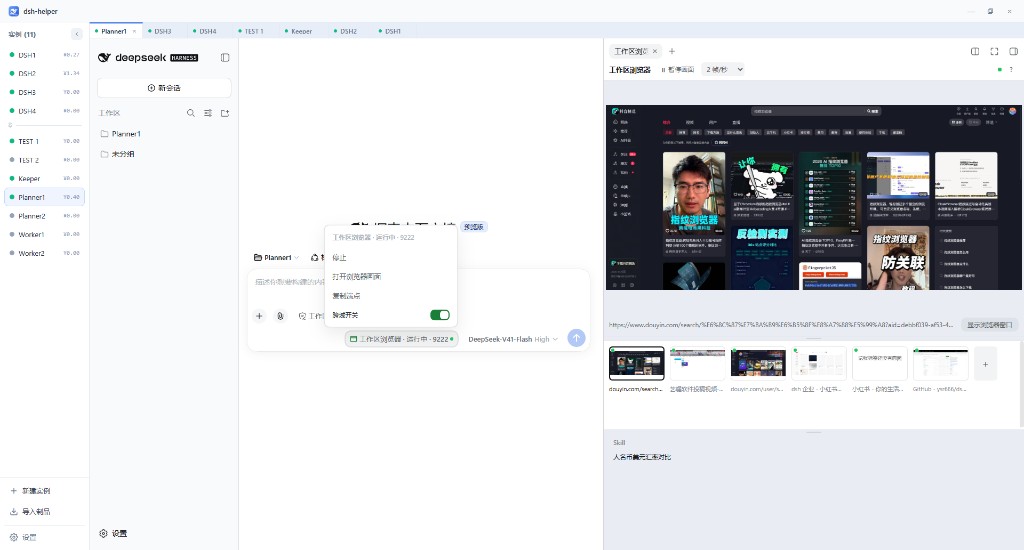
The painful case with DeepSeek Harness (dsh): you ask the model to open a page, and it attaches to the browser you already use — logins, tabs, and focus all mixed together. dsh-helper-plugin-workspace-browser is a dsh plugin that starts a separate Chrome, with a debugging port, for the current workspace. No extension, and it leaves your daily browser alone. Each workspace has its own profile, so sites need a fresh login. Chrome must already be installed.
Thirty-second feel
- Click the capsule by the composer, then Start The window appears; the sidebar shows the page
-
/browser https://… summarize thisThe model reads that page withworkspace_browser_* - Click, type, page through By the numbers on that snapshot, not by reading a screenshot
Closing the window returns to not running; it does not reopen itself. Steps that already worked can be saved as a skill — the procedure, not the element numbers from one snapshot.
Versus an extension
- An extension on the browser you already use Existing logins; mostly a text snapshot
- This plugin A separate Chrome; a live picture in the sidebar
- Tool names
workspace_browser_*, installable alongsidebrowser_*
Install into dsh
dsh plugin --profile web add github:x102201/dsh-helper-plugin-workspace-browser- Run the command on the dsh profile you use.
- Restart
dsh web. - Click Start in the capsule, or type
/browserin the composer.
This is a dsh plugin (per profile) — not a dsh-helper feature. If you run several dsh instances on one desktop, see dsh-helper. Config and deep notes live in the repo.